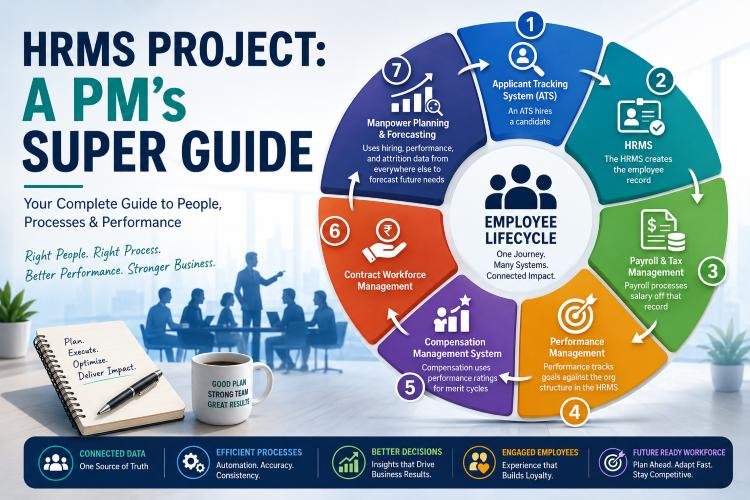
If you’ve ever been assigned to lead an “HRMS project,” you’ve probably discovered the same thing many PMs discover about six weeks in: there is no single “HRMS project.” There’s a recruitment system, a payroll system, a performance system, a compensation system, a contractor management system, and half a dozen others – each with its own vendor, its own stakeholders, its own data model, and its own opinion about who owns the “employee record.”
HR technology implementations are consistently underestimated in scope, and the reason is almost always the same: the business case names one system, but the actual project touches an entire ecosystem of interconnected applications. Understanding that ecosystem – what each system does, who uses it, and how they depend on each other – is what separates a PM who delivers a working solution from one who delivers a system nobody trusts.
This guide walks through that ecosystem from a project management lens: what you’re actually implementing, where the real risks hide, and how to run these projects so they don’t collapse under their own integration complexity.
Why This Matters to Project Managers, Not Just HR
Many PMs assume HR technology projects are “HR’s problem” with IT support bolted on. In practice, these are some of the most cross-functional implementations an organization runs – often rivaling ERP rollouts in coordination complexity, with a fraction of the executive attention.
A typical HR technology implementation will pull in:
- HR – process owners for each functional area (recruitment, performance, payroll, comp)
- Finance – payroll, budget approval, compensation planning
- IT/Security – integrations, data governance, access provisioning
- Legal/Compliance – contractor classification, pay equity, data privacy
- Every people manager in the organization – the actual end users of performance, compensation, and headcount tools
- External vendors – the software provider, systems integrator, and often a payroll compliance partner
If you’re the PM on one of these projects, your job is less “configure the software” and more “get eight stakeholder groups with different incentives to agree on a shared data model and a shared process.” That’s a project management problem first and a technology problem second.
Understanding What You’re Actually Implementing
Before you can build a project plan, you need to know which of these systems are in scope – because “implement the HRMS” almost never means one thing.
HRIS vs. HRMS vs. HCM – Get the Terminology Straight Early
Vendors use these terms loosely, and stakeholders will use them interchangeably in requirements meetings, which causes real scope confusion:
- HRIS (Human Resource Information System) – the core system of record: employee data, job history, org structure.
- HRMS (Human Resource Management System) – the HRIS plus operational processes: attendance, leave, basic payroll, self-service.
- HCM (Human Capital Management) – the umbrella term for the full ecosystem, including talent management and workforce planning.
Early in discovery, get your sponsor to define scope in terms of actual capabilities, not vendor labels – “the HRMS” can mean three very different projects depending on who’s saying it.
The Core Systems in the Ecosystem
Here’s the landscape you’re coordinating across, with project-management-relevant details for each.
1. Applicant Tracking System (ATS) Manages recruitment end-to-end – job posting, resume parsing, interview scheduling, offer management. Primary users: recruiters, hiring managers, interview panels. As a PM, your main risks here are the interview workflow configuration (every hiring manager thinks their process is special) and integration with the HRMS for new-hire data handoff.
2. Performance Management System Replaces annual appraisals with continuous goal tracking, feedback, and reviews. Primary users: every manager and employee in the company – meaning this system has the widest blast radius for change management of anything in the ecosystem. The technology is rarely the hard part; getting managers to actually adopt structured feedback habits is.
3. Talent Management System: Career pathing, succession planning, skills matrices, internal mobility. Often bundled with or adjacent to a Learning Management System (LMS) or Learning Experience Platform (LXP). Lower urgency than payroll or performance, but high strategic visibility to leadership – sponsors often care disproportionately about this module relative to its implementation difficulty.
4. Payroll and Tax Management System: Salary processing, statutory deductions, compliance filings. This is the least forgiving system in your project – errors are immediate and visible, and they erode trust in the entire program quickly. If your project touches payroll, budget extra time for parallel-run testing (running old and new payroll side by side for at least one full cycle before cutover) and treat payroll go-live as a distinct, higher-risk milestone from everything else.
5. Contract Workforce Management Governs contractors, freelancers, and agency staff – vendor management, timesheets, contract lifecycle, and access provisioning tied to contract dates. Often overlooked in initial scoping because it’s not “employees,” but misclassification and access-control failures here carry real legal exposure. Confirm early whether this is in scope; it’s a common source of mid-project scope creep.
6. Compensation Management System: Salary planning, merit cycles, bonus and equity administration, pay equity analysis. Politically sensitive – expect more approval layers and slower decision cycles than any other workstream. Build extra stakeholder review time into your schedule here rather than assuming it moves at the same pace as, say, an ATS configuration.
7. Manpower Planning & Forecasting Headcount and workforce forecasting tied to business strategy. Frequently, the last module is implemented because it depends on clean data flowing from every other system – a good reason to sequence it late in your rollout plan rather than trying to parallel-path it with foundational systems.
8. HR Analytics / People Data Platforms: Aggregates data across the whole ecosystem into dashboards and predictive models. Also typically sequenced late, since it depends on the other systems being live and producing clean data.
How These Systems Actually Connect (and Why It’s Your Biggest Risk)
Data migration and integration are consistently the top two risk factors in HR technology programs – more than user adoption, more than vendor delays, more than budget overruns. Here’s why, and how to plan around it.
The Data Flow You’re Coordinating
An ATS hires a candidate → the HRMS creates the employee record → Payroll processes salary off that record → Performance tracks goals against the org structure in the HRMS → Compensation uses performance ratings for merit cycles → Workforce Planning uses hiring, performance, and attrition data from everywhere else to forecast future needs.
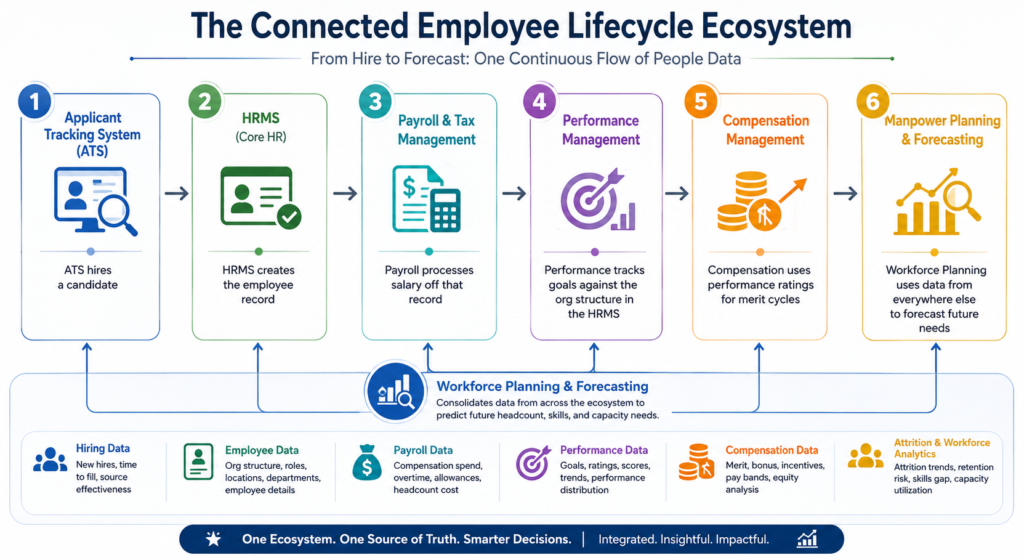
Every arrow in that chain is a potential integration point, a potential data-quality failure, and a potential point where two systems disagree about who owns the truth.
Three Integration Patterns – and What They Mean for Your Plan
- Point-to-point integrations – direct connections between two systems. Fast to stand up for one or two integrations, but the number of connections grows roughly with the square of the number of systems. If your project has more than three or four systems in scope, flag point-to-point as a long-term maintenance risk during architecture review, not just a delivery shortcut.
- HRMS as a system of record – other systems sync employee data to and from a central hub. The most common and generally the most manageable pattern for mid-size implementations. Your integration plan should explicitly state for each data field which system owns it.
- Middleware / iPaaS layer (Workato, MuleSoft, Boomi, etc.) – a dedicated integration layer handling transformation and error handling between systems. Worth the added cost and complexity on programs with five or more systems and frequent data flows; not worth it for smaller, simpler rollouts.
The single highest-leverage governance decision you can drive as PM: for every piece of employee data – title, manager, salary, location – assign exactly one system of record and document it before configuration begins. Teams that skip this step end up with the same field editable in three places and no reliable answer to “which value is correct.”
Data Migration: Budget More Time Than You Think
Legacy employee data is almost never as clean as stakeholders assume. Duplicate records, inconsistent job titles, missing historical dates, and orphaned contractor records are the norm, not the exception. Two planning implications:
- Run a data audit before you scope the migration timeline, not after – the audit result should inform your estimate, not the other way around.
- Treat data cleansing as its own workstream with its own owner (usually someone from HR Operations), not a task buried inside “configuration.”
A Practical Implementation Roadmap
A typical multi-system HR technology rollout follows a sequence like this. Depending on the scope, each phase can be a stage-gate on a traditional plan or a series of increments in an agile/hybrid delivery model – the sequence of concerns holds either way.
- Discovery and requirements – map current-state processes and pain points across every stakeholder group listed above. Resist the temptation to let HR alone define requirements; Finance and IT will surface constraints HR doesn’t know exist.
- Vendor selection – shortlist, demo, and reference-check against your actual requirements, not vendor feature lists. Ask reference customers specifically about their data migration and integration experience, not just feature satisfaction.
- Data audit and cleansing – before migration design, not after. This is where timelines most often go wrong when skipped.
- Configuration and integration build – workflows, approval chains, and connections to adjacent systems, guided by the system-of-record decisions made during architecture review.
- Pilot with a limited group – one department or region, to surface configuration and adoption issues before full rollout. Payroll pilots in particular should run at least one full parallel pay cycle before cutover.
- Training and change management – sized to the scale of process change, not just the number of new screens. Performance and compensation modules need manager-level training, not just HR admin training – managers are the primary end users of both.
- Go-live and hypercare – an intensive support period immediately after launch, staffed to catch issues in the first few cycles when they surface fastest.
- Post-launch review – measured against the original business case, typically 90–180 days after go-live, not just against go-live as the finish line.
Common Pitfalls (and How to Plan Around Them)
- Underestimating data migration effort. Build the audit before estimating the timeline, not after.
- Configuring for the current org chart only. Reorganizations happen; build flexibility into the org structure model rather than hard-coding it as of go-live day.
- Skipping manager training. HR administrators aren’t the heaviest users of performance and compensation tools — managers are. Scope training accordingly.
- Treating integration as an afterthought. Design the integration architecture alongside each system’s configuration, not after each system is built independently.
- No clear system of record. Without this decision being made explicitly and early, you’ll spend the back half of the project reconciling conflicting data instead of testing.
- Letting Compensation and Payroll move at the same pace as everything else. Both carry outsized political and financial risk; both deserve extra review cycles and a buffer in your schedule rather than being treated as just another workstream.
Where AI Is Changing the Scope of HRMS Projects
AI capabilities are increasingly embedded across this ecosystem – resume screening and candidate matching in the ATS, attrition prediction in analytics platforms, personalized learning recommendations, compensation, and pay-equity analysis at scale. For PMs, this adds two new categories of work to the scope:
- Bias auditing and validation for AI-driven recommendations, particularly in hiring, performance, and compensation decisions, with legal exposure if the underlying model is skewed.
- Employee transparency and change management around AI use: people are more sensitive to “an algorithm is involved in my raise” than to “a new system tracks my raise,” and that sensitivity requires its own communication plan, not just a training deck.
AI should augment human decision-making in these systems, not replace it – and stakeholders (especially Legal) will increasingly expect that boundary to be explicit in your solution design, not assumed.
My Final Thoughts
Managing an HR technology implementation well requires treating it as what it actually is: a multi-system, cross-functional transformation program, not a single software deployment. The technology risk is real, but it’s rarely what sinks these projects.
What sinks them is unclear data ownership, underscoped integration work, and change management that stops at “HR admins were trained.”
For PMs, the highest-value work on these programs isn’t configuring any one system – it’s forcing early clarity on system-of-record decisions, sequencing the higher-risk workstreams (payroll, compensation) with appropriate buffer, and making sure the people who’ll actually live in these systems every day – managers, not just HR – are brought along, not just informed.
Done well, these implementations don’t just replace old software. They give the organization a connected, trustworthy view of its workforce for the first time – and that’s a program worth running carefully.
If you want to bounce thoughts about HRMS Projects, do reach out to me via LinkedIn or write back to the team.